
RASTAHASHINDEPENDENT MINING JOURNALCryptoWatch

#006 / HOME-MINING

5tratumOS: my mining crew gets a control room

My miners have names, personalities and occasionally their own ideas about the daily schedule. A tidy control room feels like a good match. Here is my second node and mining corner, built around WillItMod’s 5tratumOS. The hashes do the work; I handle the coffee.

This is a tour of my own setup and my impression of its interface. The screenshots show 5tratumOS 0.8.28 BETA. Every figure is a snapshot; this website has no live connection to my devices.

The control room wears silver

My 5tratumOS setup runs on a Raspberry Pi 5 with 16 GB of RAM and a 2 TB SSD. The little computer lives in a smart silver aluminium case and runs well in my everyday use. Small on the desk, plenty of room for the node crew, and considerably better dressed than I am before the first coffee.

The front is engraved with “Tick, Tock, next Block”. If only! The case has already put in its order for the next block. While we wait for delivery, the Pi runs my nodes and pools; the actual hashing is still the miner crew’s job.
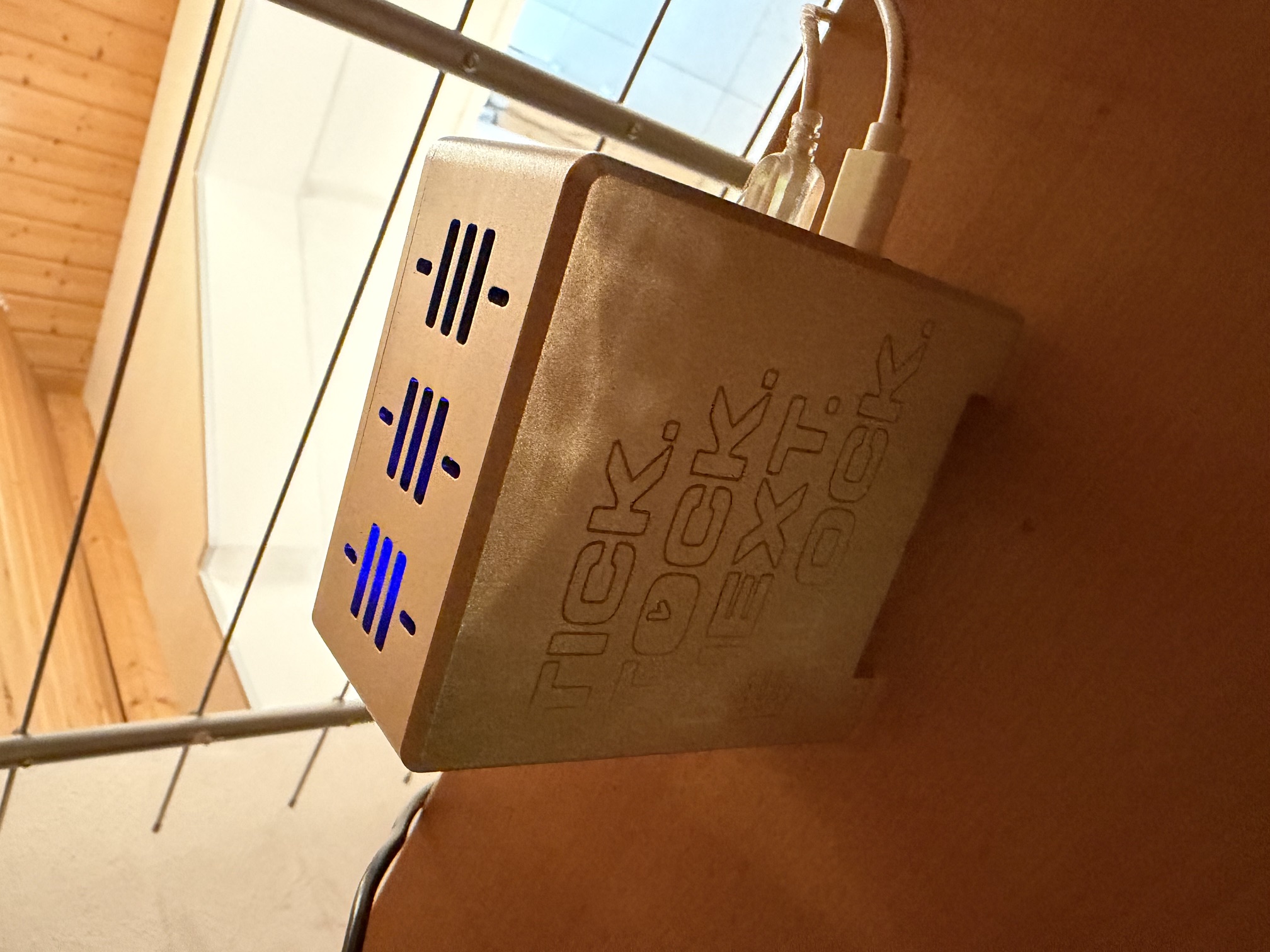
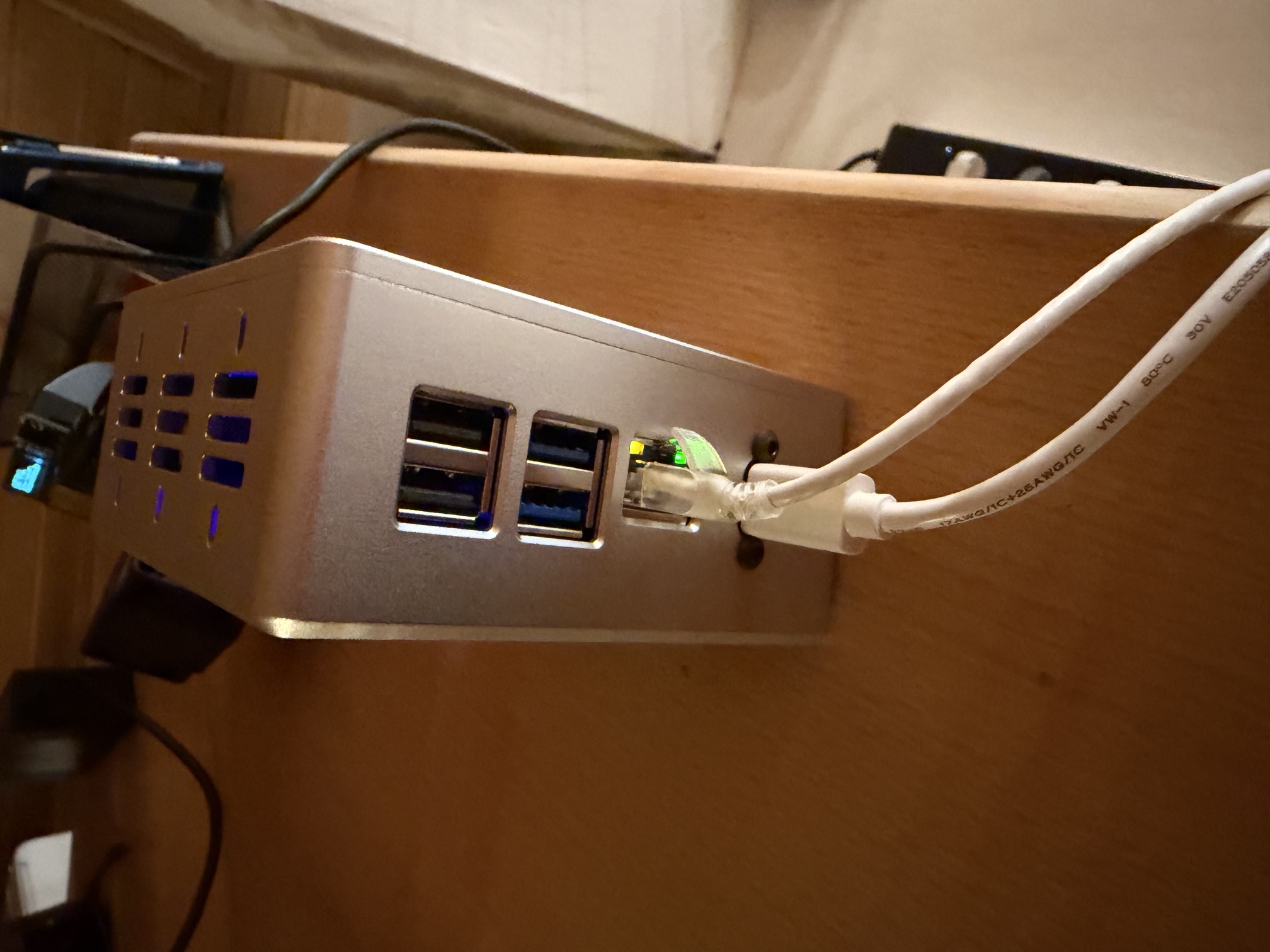
Four USB ports give this little box a pleasantly sociable side. The side photo shows both pairs of USB sockets and the connected network cable. My compact control room certainly does not need to hide behind the desk.
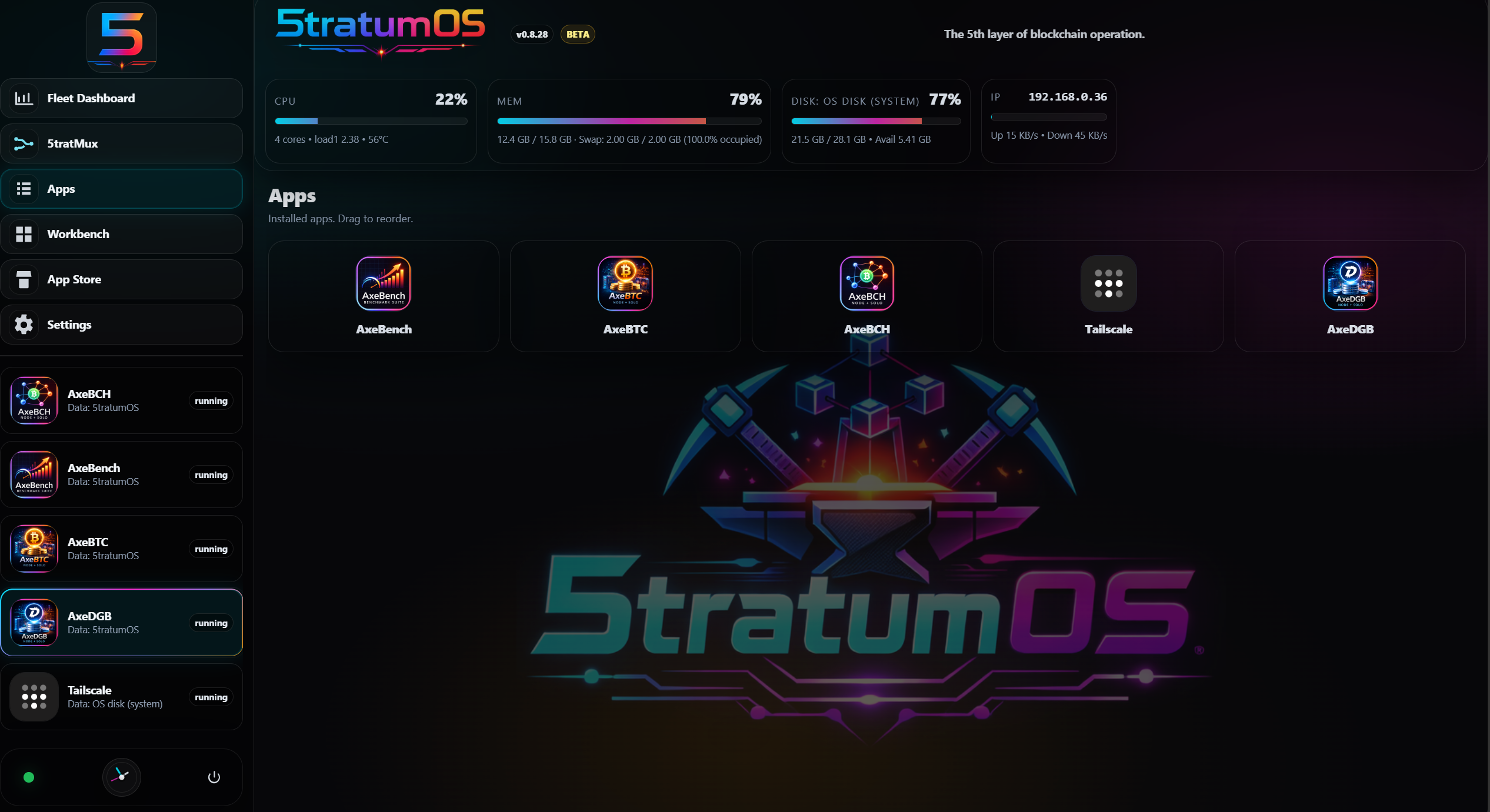
My installed apps in 5tratumOS 0.8.28
My five installed apps. The version badge belongs to the OS, not automatically to every individual app.

Who lives in my app household?

My installed crew
AppJob
AxeBench ↗Discover and group supported miners, and compare benchmarks. The crew’s toolbox.
AxeBTC ↗Bitcoin node and solo pool. The BTC room in my mining household.
AxeBCH ↗Bitcoin Cash node and solo pool. This is where the test miner in my fleet screenshot is working.
AxeDGB ↗DigiByte node and solo pool. The workbench screenshot makes the two easy to distinguish.
TailscaleMy access between my own computers. Neither a miner nor another coin pool.

Fleet Dashboard: one glance, several little stories
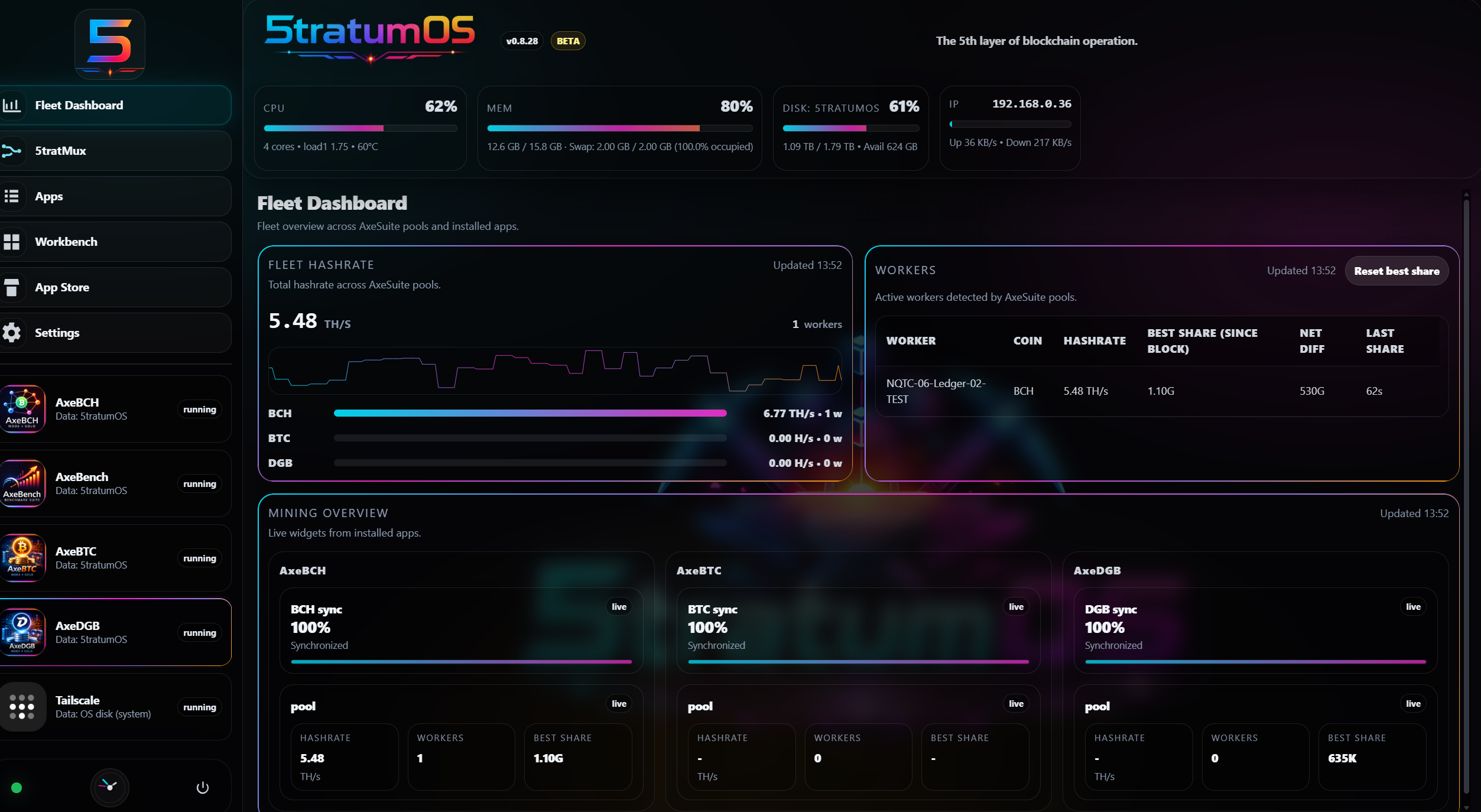
Fleet Dashboard with a BCH test worker and synchronised BTC, BCH and DGB nodes
Snapshot: 5.48 TH/s and one BCH worker in the fleet overview. BTC and DGB show no active workers here.

The worker is called NQTC-06-Ledger-02-TEST. Type abbreviation, my TH class, a Bitcoin-inspired name and the unit number: the familiar RastaHash naming system, now wearing a TEST badge. Even after my second cup, I can still tell who is working where.

The coin column says BCH. This screenshot therefore shows Bitcoin Cash mining, rather than Bitcoin mining. The three node panels are synchronised at the same time. A synchronised blockchain and an actively hashing worker are different things: a node can be ready while its pool is still waiting for customers.

Workbench: DigiByte under the bonnet
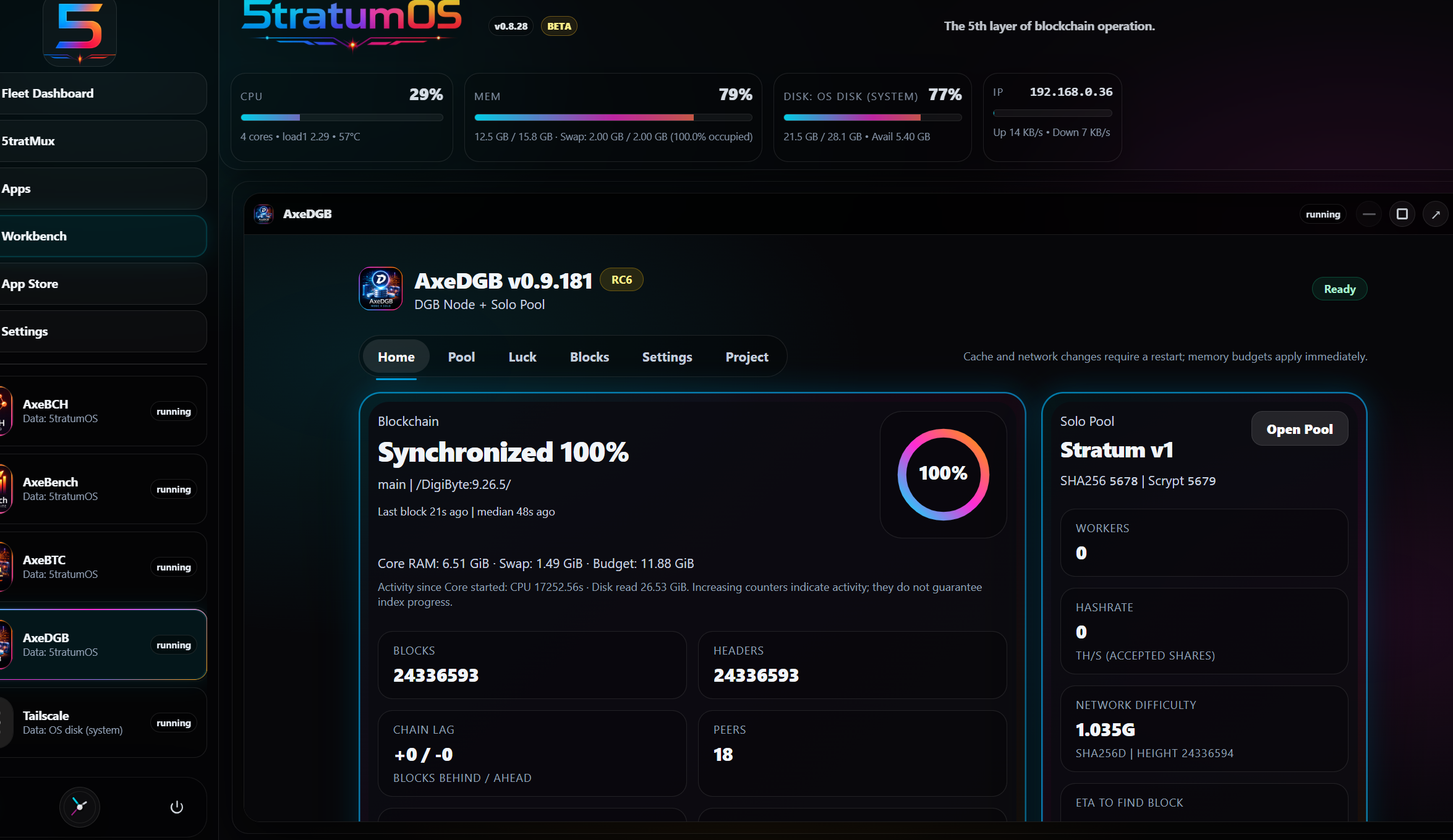
AxeDGB 0.9.181 RC6 with DigiByte Core 9.26.5, 100 percent sync and zero workers
Shown here: AxeDGB 0.9.181 RC6, DigiByte Core 9.26.5 and a Stratum v1 solo pool. These are the pictured versions, not a blanket claim about the latest releases.

The node shows 100% synchronisation and 18 peers. The pool shows zero workers and zero hashrate. No secret hashes hiding in the background: no miner is active there in this capture. I like having these separate views. The node has done its job; the pool can take a breather.

Three version numbers, no guessing game

5tratumOS is the platform, AxeDGB is the app, and DigiByte Core is the blockchain software inside it. An OS update does not automatically update every app or its core. I check Main and Dev releases separately. A new label on the toolbox does not mean every screwdriver has been replaced.

RAM, swap and an honest glance

My captures show roughly 79–80% RAM usage and the full 2 GB of swap in use. That is a useful observation about this setup, but not proof of a fault or a long-term test. Before another app moves in, I would check responsiveness, available resources and node sync. A colourful household should still leave enough room to walk down the corridor.

My first impression: keeping the crew in sight

I like having app status, nodes and workers in one overview, with the workbench ready for a closer look. The beta badge is part of the picture too: this tour is not a stability guarantee or a complete benchmark. For me, it is an interesting hobby and learning setup with plenty left to explore. Easy vibes, my own nodes, real hashes.

For what changed in the recent updates, see the separate update report.

5tratumOS ↗ · AxeSuite ↗

#006 / HOME-MINING

5tratumOS: meine Mining-Bande bekommt eine Kommandozentrale

Meine Miner haben Namen, Charakter und gelegentlich eigene Vorstellungen vom Tagesablauf. Da kommt eine übersichtliche Kommandozentrale gerade recht. Hier zeige ich meine zweite Node- und Mining-Ecke mit 5tratumOS von WillItMod. Die Miner arbeiten, ich kümmere mich um den Kaffee.

Ich zeige dir meinen Aufbau und erzähle, wie mir die Oberfläche gefällt. Die Bilder zeigen 5tratumOS 0.8.28 BETA. Alle Zahlen sind Momentaufnahmen; auf dieser Seite gibt es keinen Live-Zugriff auf meine Geräte.

Meine Kommandozentrale im silbernen Gewand

5tratumOS läuft bei mir auf einem Raspberry Pi 5 mit 16 GB RAM und einer 2-TB-SSD. Der kleine Rechner steckt in einem schicken silbernen Aluminiumgehäuse und läuft in meinem Alltag gut. Klein auf dem Tisch, mit reichlich Platz für die Node-Bande – und deutlich besser angezogen als ich beim ersten Kaffee.

Vorne steht der eingravierte Spruch „Tick, Tock, next Block“. Schön wär’s! Das Gehäuse hat den nächsten Block jedenfalls schon bestellt. Bis er vorbeikommt, betreibt der Pi meine Nodes und Pools; die eigentliche Hash-Arbeit übernimmt weiterhin die Miner-Bande.

Vier USB-Anschlüsse lassen für so einen kleinen Rechner ordentlich Platz zum Anstöpseln. Auf dem Seitenfoto siehst du die beiden USB-Paare und das angeschlossene Netzwerkkabel. Meine kleine Kommandozentrale kann sich also auch von dieser Seite sehen lassen.

Meine installierten Apps in 5tratumOS 0.8.28
Meine fünf installierten Apps. Die Versionsanzeige gehört zum OS, nicht automatisch zu jeder einzelnen App.

Wer wohnt in meiner App-WG?

Mein installiertes Team
AppAufgabe
AxeBench ↗Miner entdecken, gruppieren und Benchmarks vergleichen. Der Werkzeugkoffer für unterstützte Geräte.
AxeBTC ↗Bitcoin-Node und Solo-Pool. Mein BTC-Zimmer in der Mining-WG.
AxeBCH ↗Bitcoin-Cash-Node und Solo-Pool. Hier arbeitet der Testminer aus dem Fleet-Bild.
AxeDGB ↗DigiByte-Node und Solo-Pool. In der Workbench-Ansicht sind Node und Pool getrennt zu sehen.
TailscaleMein Zugang zwischen den eigenen Rechnern. Kein Miner und kein weiterer Coin-Pool.

Fleet Dashboard: ein Blick, viele kleine Geschichten

Fleet Dashboard mit BCH-Testworker und synchronisierten BTC-, BCH- und DGB-Nodes
Momentaufnahme: 5,48 TH/s und ein BCH-Worker in der Fleet-Übersicht. BTC und DGB zeigen hier keine aktiven Worker.

Der Worker heißt NQTC-06-Ledger-02-TEST. Typkürzel, meine TH-Klasse, Bitcoin-inspirierter Name und Gerätenummer – das bekannte RastaHash-Namensschema, diesmal mit einem TEST-Schildchen. So weiß ich auch nach der zweiten Tasse noch, wer wo arbeitet.

Die Coin-Spalte sagt BCH. Das ist in diesem Bild also Bitcoin-Cash-Mining, nicht Bitcoin-Mining. Gleichzeitig sind die drei Node-Ansichten synchronisiert. Eine synchronisierte Blockchain und ein aktiv hashender Worker sind zwei verschiedene Dinge: Die Node kann bereit sein, während ihr Pool noch auf Kundschaft wartet.

Workbench: DigiByte unter der Motorhaube

AxeDGB 0.9.181 RC6 mit DigiByte Core 9.26.5, 100 Prozent Sync und null Workern
Im Screenshot siehst du AxeDGB 0.9.181 RC6, DigiByte Core 9.26.5 und einen Solo-Pool mit Stratum v1. Die Versionsangaben gehören zu dieser Aufnahme; sie sagen nichts darüber aus, was heute aktuell ist.

Die Node zeigt 100 % Synchronisation und 18 Peers. Der Pool zeigt null Worker und null Hashrate. Keine schlafenden Hashes im Hintergrund: In dieser Aufnahme ist dort schlicht kein Miner aktiv. Genau solche getrennten Anzeigen gefallen mir – die Node hat ihren Job erledigt, der Pool darf noch entspannt warten.

Drei Versionsnummern — wer gehört wohin?

5tratumOS ist die Plattform, AxeDGB die App und DigiByte Core die Blockchain-Software darin. Ein OS-Update aktualisiert nicht automatisch jede App oder deren Core. Main- und Dev-Veröffentlichungen prüfe ich getrennt. Neues Etikett auf der Werkzeugkiste heißt schließlich nicht, dass sämtliche Schraubendreher ausgetauscht wurden.

RAM, Swap und ein ehrlicher Blick

In meinen Bildern sind rund 79–80 % RAM und der volle 2-GB-Swap belegt. Das ist eine nützliche Beobachtung für mein Setup, aber noch kein Beweis für ein Problem oder einen Dauertest. Bevor noch eine App einzieht, schaue ich lieber auf Reaktionszeit, freie Ressourcen und Node-Sync. Die WG soll ja nicht nur bunt aussehen, sondern auch ordentlich durch den Flur kommen.

Mein erster Eindruck: die Bande gut im Blick

Mir gefällt die gemeinsame Übersicht mit App-Status, Nodes und Workern. Dazu kommt die Workbench für den genaueren Blick. Die Beta-Kennzeichnung gehört aber zum Bild: Dieser Rundgang ist kein Stabilitätsversprechen und kein vollständiger Benchmark. Für mich ist das ein spannendes Hobby- und Lernsetup mit viel Stoff zum Weiterprobieren. Gute Laune, eigene Nodes, echte Hashes.

Was sich bei den jüngsten Updates geändert hat, steht im separaten Update-Bericht.

5tratumOS ↗ · AxeSuite ↗

Back to journal